
Crossfader
Overview
Crossfader, by Tech Audio, is a small utility to quickly apply crossfades between two or more media items.
Prerequisites
- ReaImGui API available via ReaPack
Crossfader Window
The main Crossfader window is a simple parameter box that lets you specify the two values needed to apply a crossfade:

-
Fade Length: the duration of the crossfade
-
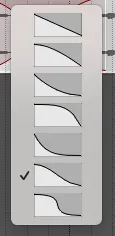
Fade Type: the shape of the crossfade, corresponding to the shapes provided by REAPER (and shown below):
- Linear, Slow Exponential, Slow Logarithmic, Fast Exponential, Fast Logarithmic, Slow Sine, Fast Sine
-
“Go”: align the two-or-more selected media items and apply the specified crossfade.
Selecting a new shape will apply it to any crossfades between selected items.